 Fellow Canadians: All inFlow plans are available in Canadian dollars




Key takeaways
- Multi-location inventory management is the practice of tracking and controlling stock across more than one location, such as warehouses, retail stores, service vans, or job sites, from a single system.
- It isn’t just for big chains. Small and medium-sized businesses with a second warehouse, a showroom, or a few service vehicles benefit from multi-location inventory tracking too.
- The biggest challenges are keeping counts accurate at every site, moving stock between locations, and allocating products to match local demand.
- Best practices include using one system as your single source of truth, setting reorder points and safety stock for each location, and transferring stock between sites before placing new purchase orders.
- In inFlow’s 2026 survey of 400 operators, 44.8% named inaccurate inventory data as a top challenge, and that problem multiplies with every location you add.
When we say multi-location, you probably think of chain stores like Walmart and Target. Maybe even Costco. Retail juggernauts with many locations across many different cities, states, and even countries. However, multi-location inventory management is a necessity for medium-sized and plenty of small businesses as well.
In fact, the moment you add a second warehouse, open a storefront next to your stockroom, or load inventory onto a service van, you’re managing stock in more than one place. (And yes, that van counts as a location.)
So: what is multi-location inventory management? When does your business need it? And what are some things to keep in mind when implementing a multi-location system? Let’s dig in.
What is multi-location inventory management?
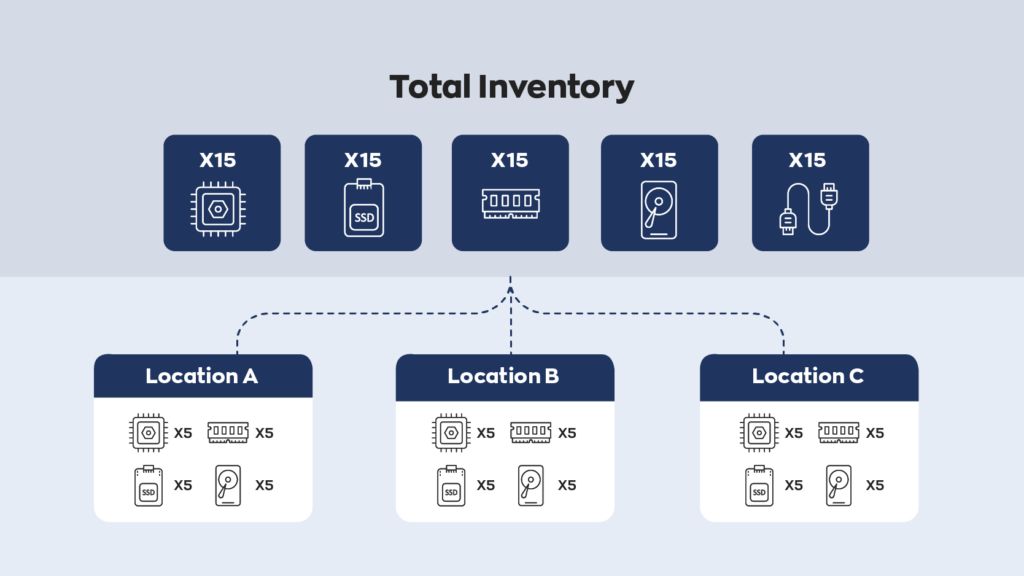
Multi-location inventory management is the practice of tracking, moving, and replenishing stock across two or more physical locations, such as warehouses, retail stores, service vehicles, or job sites, from one central system. It shows you how much of each product sits at each location, along with a combined total for the whole business.
As the name suggests, it’s all about managing inventory across more than one location. There are a lot of reasons a business may do this. The most obvious one is that if your business has more than one location, you (usually) need more than one storage location.
But a “location” doesn’t have to be a building with a loading dock. Depending on your business, it could be:
- A warehouse or distribution center
- A retail store or showroom
- A service van or truck
- A construction job site
- A consignment partner’s store
- A specific aisle, shelf, or bin inside a larger space (more on sublocations later)
Multi-location vs. multi-warehouse inventory: what’s the difference?
Multi-warehouse inventory management is one type of multi-location inventory management. Every multi-warehouse business is a multi-location business, but not every multi-location business runs more than one warehouse. A plumbing company with one stockroom and six service vans, for example, is managing seven locations and only one warehouse.
| Multi-location inventory management | Multi-warehouse inventory management | |
|---|---|---|
| What counts as a location | Any place stock is kept: warehouses, stores, vans, job sites, consignment partners | Warehouses and distribution centers only |
| Typical businesses | Retailers, field service companies, contractors, wholesalers, manufacturers | Distributors, ecommerce brands, 3PLs |
| Main focus | Visibility and stock movement across every site | Storage, picking, and fulfillment between warehouses |
Why is multi-location inventory management important?
Multi-location inventory management matters because it keeps the right stock in the right place. Done well, it cuts shipping and labor costs, prevents stockouts at individual sites, and gives you an accurate picture of what the business actually owns.
Renting another warehouse or storage unit might sound more expensive, but it can cut costs elsewhere. Having a nearby location to pull inventory from can save on shipping and labor costs. In some instances, it can also be cheaper to rent two smaller warehouses than one massive one.
Cost isn’t the only reason, though. Here’s what else is at stake:
- Fewer stockouts. According to IHL Group’s 2025 inventory distortion research, retailers lose 6.5% of global retail sales to out-of-stocks and overstocks, roughly $1.2 trillion and $572 billion respectively. Closer to home, 44% of operators in inFlow’s State of Inventory Management 2026 survey hit a stockout at least once a month.
- Faster fulfillment. In that same survey, 55.8% of operators fulfill orders within two days, but 38.5% take three to five. Stock that sits closer to the customer (or the job) shortens that gap.
- Customer trust. In inFlow’s 2026 survey of 1,000 U.S. shoppers, 77% trusted a seller’s inventory accuracy less after a stockout, and 20% said reliable visibility into what’s in stock nearby would have helped most. You can only offer that visibility if you know exactly what each location holds.
When do you need multi-location inventory management?
You need multi-location inventory management the moment your stock lives in more than one place that you have to count, replenish, or sell from separately. A few common signs:
- You’ve opened a second store, warehouse, or showroom.
- Your technicians or crews carry stock in their vehicles.
- You send materials out to job sites.
- You place products with consignment partners.
- Nobody can answer “how many do we have, and where?” without a phone call or a walk to the back.
If a business has more than one retail location, each store is usually its own stocking location, and many businesses add a central warehouse to feed them. There are some exceptions. If both stores are close enough, you can sometimes get away with one shared stockroom.
There are also more nuanced instances where multi-location inventory management makes sense. If a business carries many different products of different sizes, it could be worth separating them in different warehouses. The closer warehouse would store the higher-demand products, while the further one would store lower-demand products.
This makes it easier to keep up with demand as long as you can manage things correctly. However, setups like this are the exception rather than the norm.
More often, the trigger is simple growth. When inFlow analyzed nearly 4,000 pieces of customer feedback for the State of Inventory Management 2026 report, the language businesses used right before switching systems was strikingly uniform. Phrases like “no longer sustainable due to business growth” came up again and again. Adding a location is one of the most common growth events there is.
Centralized vs. decentralized inventory: which model fits your business?
Most multi-location businesses run one of three models: centralized, decentralized, or a hybrid of the two. In a centralized model, one main warehouse holds most of the stock and replenishes every other location. In a decentralized model, each location buys and manages its own inventory. A hybrid model mixes the two, which is where most growing businesses end up.
| Centralized | Decentralized | Hybrid | |
|---|---|---|---|
| How stock flows | Suppliers ship to one central warehouse, which transfers stock out to each location | Suppliers ship directly to each location | Fast movers stocked locally, everything else replenished from a central warehouse |
| Best for | Businesses with a main warehouse feeding stores, vans, or job sites | Locations far apart with very different customers | Growing businesses with a mix of high- and low-demand products |
| Biggest advantage | Better purchasing power and tighter control | Faster local response | Balances cost and speed |
| Biggest risk | Transfer delays if the central site falls behind | Duplicate stock and overstock across sites | More moving parts to track |
There’s no single right answer. A field service company with one warehouse and a fleet of vans is naturally centralized. A retailer with stores in two different states may need more local control. Whichever model you choose, the system behind it needs to show you every location at once.
How do different industries manage inventory across locations?
Some industries place greater value on a multi-location system than others, and each one uses it a little differently.
Retail and ecommerce
Retailers treat each storefront, backroom, and fulfillment center as its own location. The goal is to keep every shelf stocked without burying any one store in excess inventory. Some also place stock with partner shops, which is where consignment inventory tracking comes in.
Wholesale and distribution
Distributors often run several warehouses to shorten delivery times to customers in different regions. For them, multi-location management is mostly about allocation: which warehouse should hold how much, and which one ships each order.
Manufacturing
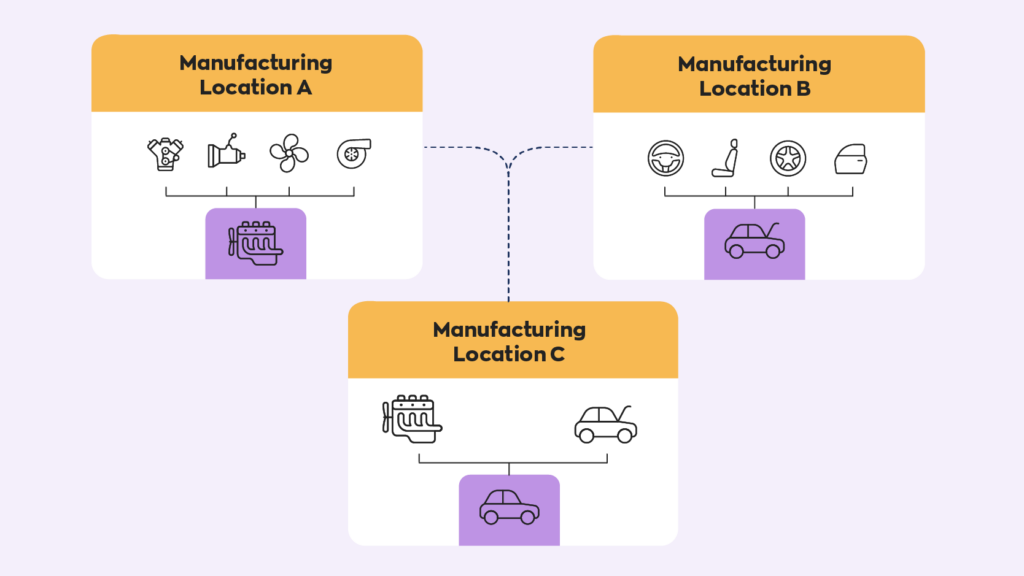
Multi-site manufacturers can send their products through different facilities where each one performs a different task, such as producing components or subassemblies at one plant and assembling the finished product at another. Many pair this with lean manufacturing principles, which focus on cutting waste at every step. Splitting production this way helps manufacturers keep better track of the process itself and compartmentalize different parts of the business.
Field service and trades
For HVAC, plumbing, electrical, and other field service businesses, every truck is a mobile stockroom. Tracking each van as its own location tells you exactly which parts a technician has on board before they head out. That matters more than it sounds. In inFlow’s 2026 stockout survey, 40% of business buyers who hit a stockout said a technician couldn’t finish the job on the first visit.
Construction
Contractors move materials between a central yard, trucks, and active job sites. In inFlow’s survey of 108 construction and trades operators, 86% track inventory in spreadsheets and 81% use no dedicated inventory software at all. That works on one site. Across several active jobs, it’s how material ends up in two places at once (at least on paper).
What are the biggest challenges of multi-location inventory management?
The biggest challenges of multi-location inventory management are keeping counts accurate at every site, moving stock between locations without losing track of it, and allocating products to match local demand. Team communication, supply chain bottlenecks, and access control round out the list.
If all of this sounds complicated, that’s because it is. Managing inventory on a single site already has a lot of intricacies. Switching to a multi-site system multiplies them. And because sales depend directly on inventory, messing something up can cause a lot of damage. Managing multiple locations also introduces entirely new challenges. Here are some to keep in mind.
Keeping stock levels accurate at every location
This is the biggest challenge, as well as the most obvious one. Because tracking inventory at one location can already be difficult, switching to multi-location means that the difficulty is multiplied. Every site adds more counts, more receiving, and more chances for a number to drift away from what’s actually on the shelf.
We hear this from growing businesses all the time. On a recent call with inFlow’s sales team, the controller of an equipment rental and service business explained the problem with keeping parts across three locations while tracking inventory in QuickBooks alone:
“It also means we aren’t able to track our inventory really by location.” – Controller at an equipment rental and service business
The data backs this up. In inFlow’s State of Inventory Management 2026 survey, 44.8% of operators named inaccurate inventory data as a top challenge, and 74.3% still rely on spreadsheets as their sole or primary tracking tool. A spreadsheet can hold up at one location. Across five, it usually means five versions of the truth. (If you’re not sure how accurate your counts are today, our inventory accuracy formula is a good place to start.)
Moving stock between locations
Every time stock moves from one site to another, it has to leave one location’s count and land in the other’s. If either side of that handoff gets skipped, the item is effectively lost in transit, even if it’s sitting right there on a pallet.
Handoffs are where errors pile up. A 2018 study by Auburn University’s RFID Lab and GS1 US found that 69% of orders shipped from brands to their retail partners contained data errors when tracked with traditional methods. That study looked at shipments between companies, but the lesson applies just as much to transfers between your own sites: every handoff needs a record on both ends.
Allocating inventory to match local demand
The number of sales between different sites will naturally differ. This is due to a number of factors outside of your direct control, such as climate, local culture, and the customers each location serves. This means that, in theory, there’s a perfect allocation of products between locations. In practice, though, it can be difficult to find. If you allocate too much to one site, you risk losing sales at another. If you allocate too little, that site runs out while another sits on extra stock.
Keeping teams at each site on the same page
This challenge isn’t as tangible as the ones above, but it’s still a large factor. Despite being in different areas, every location shares the same goal: serving customers and growing sales. That means communication between sites is important, whether it’s flagging a low-stock item, requesting a transfer, or knowing that the other store already promised its last unit to a customer.
When each location keeps its own notes, those messages get lost. A shared system where everyone sees the same numbers removes a lot of the back-and-forth.
Bottlenecks and supply chain delays
While more of an issue for manufacturers, bottlenecks continue to be a relevant issue for businesses around the world. When products don’t move quickly enough, it backs up the entire supply line. Everything slows down, and because multiple sites mean more overhead costs, it’s a bigger issue for multi-site systems.
Supply lines add their own complexity. Very few businesses carry only one or two products, and the more products you have, the more supply lines you need. Adding locations means new shipping routes and a redistribution of manpower. It also means more exposure to problems outside your control: 52% of operators in inFlow’s 2026 survey named supplier reliability as a top challenge, and 64.5% saw freight costs rise over the past year.
Controlling who can access each location
The more locations you run, the more people handle your stock. That’s not a problem on its own, but it makes accountability harder. When something goes missing, you want to know which location it went missing from and who had access. With 80% of operators reporting annual inventory shrinkage between 1% and 5%, according to inFlow’s 2026 survey, even a small leak at one site adds up quickly.
Multi-location inventory management best practices
The best way to manage inventory across multiple locations is to run every site from one shared system, set replenishment rules for each location, and move stock between sites before buying more. The tips below show how to put that into practice.
The basics of inventory management are the same for multi-location systems. But there are enough differences between the two that figuring out where to go can be difficult. Here are some tips and tricks to help set the foundation for a proper system going forward.
Use one system as your single source of truth
Some single-site businesses manage their inventory by manually updating a spreadsheet. It’s one possible avenue, but it’s also terribly inefficient and prone to error. Trying to do that across multiple locations is even worse, because every site ends up keeping its own version of the numbers.
Using software like inFlow to keep track of everything, including invoicing, inventory management, and purchasing, goes a long way in cutting costs elsewhere. Every location updates the same records, so a sale at one store or a part used on a job shows up for everyone right away. inFlow’s Current Stock view can also be filtered by location and sublocation, so each team sees exactly what’s relevant to them. Higher-tier plans can add location-based access restrictions too, so team members only see and move stock at the sites they work from.
Standardize SKUs, barcodes, and processes across locations
If one store calls a product “BLK-TEE-M” and another calls it “Black T-shirt Medium,” your system will treat them as two different items. Use the same SKUs and labels everywhere, and make receiving, counting, and transfers work the same way at every site.
Barcodes make this much easier. Scanning records an item once, correctly, instead of relying on someone to type it in. That matters, since 81.2% of operators in inFlow’s 2026 survey already use barcode scanning in some form.
Set reorder points and safety stock for each location
Allocating products is a delicate process. Too little at one location results in a loss of sales. Too much, and you’re spending more on overhead. That overhead is real: 54% of operators in inFlow’s 2026 survey report holding costs above 10% of inventory value.
This is where reorder points and safety stock come in handy. Safety stock will cover you for those “just in case” moments, and reorder points help you order the right amount of products at the right time. The key in a multi-location setup is to set them with each location in mind, since a busy downtown store and a quiet satellite location shouldn’t share the same minimums.
With inFlow, you can set reorder points for your products and reorder by location, and low-stock email notifications group products by location so you know exactly where to restock.
Transfer stock between locations before placing new orders
Before you buy more of something, check whether another location already has too much of it. Moving existing stock is almost always cheaper than buying new stock, and it keeps excess inventory from piling up at one site.
The key is to record every transfer on both ends. In inFlow, a stock transfer moves products from one location to another and shows them as “In transit” until the receiving location confirms they’ve arrived. If you run a central warehouse, you can even set reorder settings so inFlow creates a stock transfer from that warehouse, instead of a purchase order, when a location drops below its reorder point.
Forecast demand by location
It’s impossible to forecast demand with perfect accuracy, but it’s possible to get a fairly accurate estimate. Use these estimates when deciding how many units to allocate to each location. Proper allocation will result in greater profits and lower overhead costs.
This is another area where software like inFlow can help. With inFlow’s robust reporting, you can see how your inventory is selling at each location. This will allow you to make more informed decisions when stocking your inventory.
Run regular cycle counts at every site
Don’t wait for one big annual count to find out a location’s numbers are off. Instead, use rolling cycle counts of a few high-value or fast-moving items each week, rotating through every location. Half of the construction and trades operators in inFlow’s 2026 survey already run monthly cycle counts, which makes a solid baseline for any industry.
Organize each location with sublocations
Knowing an item is “in the warehouse” only helps so much when the warehouse is 20,000 square feet. Sublocations break each location down further, into aisles, shelves, bins, or even a specific spot in a van. inFlow has sublocations turned on by default, so your team can find exactly where something is without a scavenger hunt.
What should you look for in multi-location inventory software?
Good multi-location inventory software shows stock levels at every location in one place, records transfers between sites, and lets you set replenishment rules per location. Here’s a quick checklist to compare options against.
| Feature | Why it matters for multi-location businesses |
|---|---|
| Stock levels by location | See what each site holds, plus a company-wide total, without calling around |
| Stock transfers with in-transit tracking | Stock never disappears between sites, because both ends of the move are recorded |
| Reorder points and reordering by location | Each site gets restocked based on its own demand, not a company-wide average |
| Sublocations | Find items down to the aisle, shelf, bin, or vehicle |
| Barcode scanning on mobile | Count, receive, and transfer stock on the floor or in the field with fewer typos |
| Location-based reporting | Compare sales and stock movement between sites to fine-tune allocation |
| User access by location | Control who can view and move stock at each site |
| Integrations | Keep your accounting and ecommerce platforms in sync with every location |
If you’re still on spreadsheets and wondering whether it’s time to switch, our guide to the signs you’ve outgrown spreadsheets for inventory is worth a read. And once you’ve picked a system, this inventory software implementation guide walks through the rollout step by step.
Wrapping up
Multi-location inventory management is an incredibly important part of any multi-location business. It ensures that products stay in stock, supply lines remain steady, and revenue keeps flowing.
At the same time, managing inventory across multiple locations can prove rather difficult. Every site you add multiplies the counts, transfers, and decisions you have to get right. The good news is that you don’t have to manage it all by hand. It’s best to take advantage of modern perpetual inventory systems like inFlow so you can track things automatically, move stock between locations in a few clicks, and see every site at a glance. There’s a reason we were rated #1 on SoftwareWorld’s list of top inventory management software.
Whether you’re opening your second location or your twentieth, the right system will grow right along with you.
FAQ
What is an example of multi-location inventory management?
A common example is an HVAC company with one central warehouse and six service vans. Each van is tracked as its own location, so the office knows which parts every technician carries. When a van runs low, stock is transferred from the warehouse instead of buying more. The same idea applies to a retailer with three stores or a contractor moving materials between a yard and several job sites.
Is multi-location inventory management only for large businesses?
No. Multi-location inventory management applies to any business that keeps stock in more than one place, including small businesses with a single warehouse and a storefront, or a few service vehicles. Smaller businesses often feel the pain sooner, since they run on tighter margins and can’t afford stock sitting idle at the wrong location.
What is in-transit inventory?
In-transit inventory is stock that has left one location but hasn’t been received at the next one yet. It still belongs to your business, but it can’t be sold or used until it arrives. Tracking in-transit inventory separately keeps it from disappearing from your counts during a transfer and stops anyone from promising it to a customer before it lands.
How do you transfer inventory between locations?
To transfer inventory between locations, record the products and quantities leaving the sending location, mark the shipment as sent, and confirm it at the receiving location once it arrives. Recording both ends of the move keeps each site’s count accurate. Inventory software like inFlow handles this with a stock transfer that shows items as “In transit” until they’re received.
How often should you count inventory at each location?
Most businesses benefit from rolling cycle counts at every location rather than one large annual count. Counting a handful of high-value or fast-moving items each week catches errors while they’re still small. Monthly cycle counts are a solid baseline; in inFlow’s 2026 survey, half of construction and trades operators already count at least that often.
What is the best software for managing inventory across multiple locations?
The best software for multi-location inventory management shows stock levels at each location, tracks transfers between sites, and supports reorder points by location. inFlow Inventory does all three, along with sublocations, mobile barcode scanning, and location-based reporting. It’s built for small and medium-sized businesses that have outgrown spreadsheets but don’t need a full ERP.
0 Comments